Integrating cloud telephony into Customer Service Suite (CSS) to unify voice calls with other channels, giving agents all interaction context in one place.
In light of Freshworks' existing Omnichannel product for customer support, which revolves around Freshdesk as the core supporting various add-ons like chat, email, WhatsApp, and calling, it became evident that the industry demands a more evolved solution. The current setup feels fragmented, with each feature resembling individual products and lacking in context maintenance across channels.
To address this gap,it was proposed the development of a Customer Support Suite (CSS), aiming to create a centralized conversation inbox spanning all channels. This suite would record all customer conversations in one place, ensuring easy access to customer context for agents.
The envisioned CSS would integrate cutting-edge AI functionalities, empowering agents to engage in conversations with complete context directly from a unified interface. This unified view fosters seamless collaboration among teams, facilitating efficient support delivery across all users.
In my role within this project, I focused on enhancing the user experience specifically for the cloud telephony channel, leveraging our in-house product, Freshcaller, to contribute to the overall success of the CSS initiative.
In the user’s words
It is difficult to get previous tickets raised by a customer easily in this product. I waste my time searching and keeping customers waiting. Any easier method where all tickets for one customer are easily available?
Joe
Agent @ Puppycare
I use Omnichannel, the calling widget size covers the entire browser height, this makes it difficult to see the ticket information . Can this be movable or something?
Samantha
Agent @ Vimanam
We use both Freshcaller and Freshchat, it gets tedious to maintain the app. Are you guys thinking about getting Freshcaller in Freshchat?
Annie
Supervisor @ Smartgym
Freshcaller Analysis
Seeing the customer queries and responses, it's evident that improvements are needed to enhance the user experience. Agents find the current calling widget too large, obscuring ticket information, and struggle to quickly access previous customer tickets. Additionally, managing separate applications for calls and chats is cumbersome. Addressing these issues by making the calling widget adjustable and consolidating context within a single click or no clicks at all will significantly improve efficiency and user satisfaction.
Competitor Review
Intercom
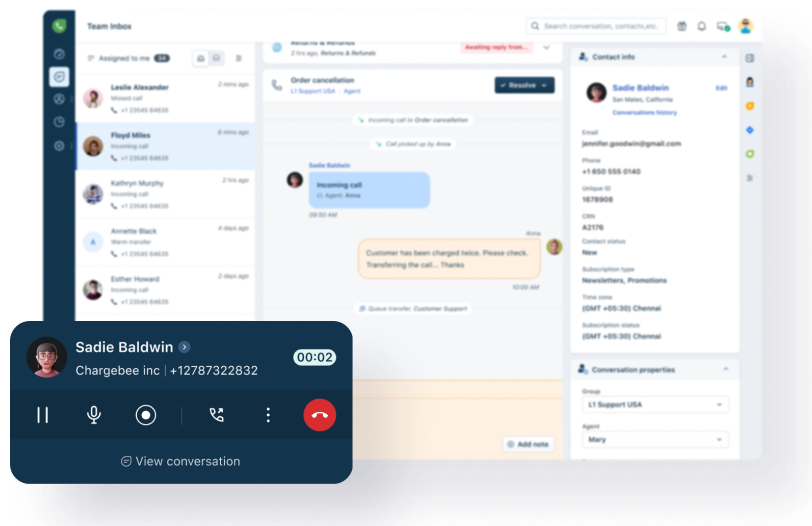
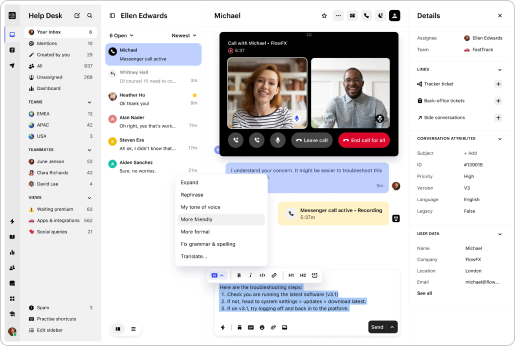
Calling Widget: Pop-over and collapsible, with all call actions contained within the widget.
Voice Channel: Marked as a separate conversation for the customer.
Customer Details: Listed in one place, providing comprehensive context
Gladly
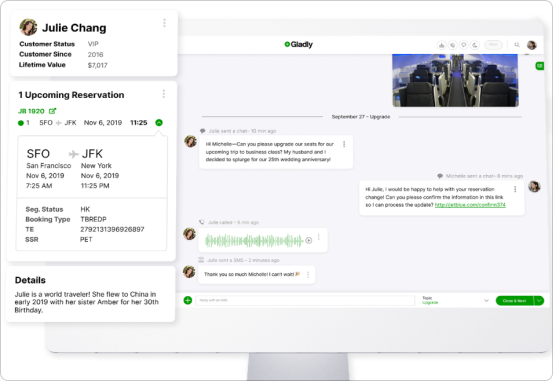
Conversation Continuity: Detailed, continuous conversation history for each customer, with all channels appended.
Customer Details: Displayed side by side, offering immediate context.
Aircall
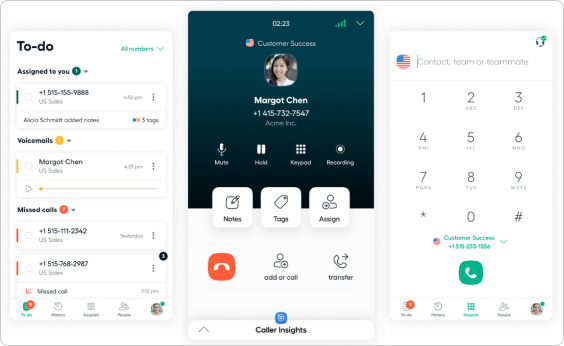
Call Widget: Organized into during-call actions, action items, and current call actions.
Caller Insight: Included within the widget.
Layout: Resembles a mobile app, allowing users to perform multiple actions. Effective as a widget on top of other customer support products.
Summary
Competitor analysis shows that integrating voice into customer support software can be optimized by ensuring the calling widget is unobtrusive and easily navigable, providing comprehensive customer details in a single view, and maintaining continuous, multi-channel conversation histories. These insights will guide enhancements to our voice integration strategy.
Design concepts
Option 1
Rationale: A darker color is chosen for the widget to create a stark contrast against the light Inbox page, making the widget more noticeable. The familiar grouping of actions from the old widget is retained to ensure users do not have to relearn the interface. The widget expands only when necessary to maintain a clean and unobtrusive appearance.
Option 2
Rationale: This option features a call bar at the top of the page, designed to be minimalistic and sleek. Primary call actions are readily accessible, while secondary actions (like call transfer) expand upon interaction. This represents a significant departure from the current widget design, offering a streamlined user experience.
Option 3
Rationale: Call actions are integrated within the chat box, similar to other communication channels, thereby saving page space. However, this approach proved impractical as users needed to return to the screen repeatedly for call actions, limiting its scalability and usability.
Final widget design
Creating a new expereince
Including the Conversation/Inbox page with the Freshcaller widget has significantly enhanced the way an agent works. It provides a larger canvas space, offering instant context and reducing the time to resolve conversations compared to the old Freshcaller experience. This integration allows agents to access detailed client information, the call journey, private notes, and call recordings in on go.
By seamlessly fitting the Freshcaller widget into the unified inbox page, the new design improves user experience, agent efficiency, and overall SLA performance.
The feature
Learning
Effective Time Management: Managing a project within a tight deadline taught me the importance of prioritization and maximizing available time. Given more time, I could have conducted deeper research and potentially achieved different outcomes.
Challenges of Innovation: Breaking away from routine and proposing unconventional ideas requires mastering the art of convincing project leaders. I recognize the need to enhance my skills in presenting and advocating for innovative designs.
Continuous Improvement: Learning from feedback is crucial. I aim to refine my approach based on insights gathered from stakeholders' responses, ensuring future proposals are more aligned with project goals and stakeholders' expectations.
Other projects
Freshsuccess
Data Integration studio
A no code interface to set up, customise, and maintain data to create a true Customer 360 record in Freshsuccess.
View project
Miscellaneous
Project Palette
A glimpse of my diverse range of projects, featuring my expertise in mobile, website, logo design etc.